Hearts tutorial
Introduction
In this tutorial, you will build a complete, working Hearts game on BGA Studio.
If you haven't already, read the rules of Hearts so you know what we are talking about!
We will implement the common passing variant, use the minor rule variant where the 2♣ starts the first trick, and end the game at 100 points.
Compare with the production version
If you get stuck and need the source code, you can get read-only access to the Hearts project on the Studio projects page. Select Already published to see the production project. There will be some small differences, as we simplified the tutorial version.
JavaScript or TypeScript
If you're not familiar with TypeScript, we recommend following the JavaScript version of this tutorial.
If you're more comfortable with TypeScript than plain JavaScript, you can follow the TypeScript version.
Any differences between the JavaScript and TypeScript versions will be shown like this:
I want to stick to JavaScript!
Typing for the win!
Set up a version control repository
It's best to keep a history of your changes right from the start. If we break something by mistake, we can easily go back to the last committed version.
For this tutorial, we will use a local Git repository. For a real project, it would be safer to keep a copy in a remote repository too.
First, create a .gitignore file so we don't commit the credentials in the .vscode folder. We will also add node_modules for those working with TypeScript.
Then run:
We now have a local Git repo ready! After each step of this tutorial, we will commit the changes.
Using TypeScript (or not)
You can delete the src-disabled folder, tsconfig.json and rollup.config.mjs. Remember, we committed them, so you can always recover these files if you change your mind.
Rename src-disabled to src. Run npm i to install the dependencies in node_modules. The package.json file is already set up. If you configured the Run on Save extension correctly, Game.js should update automatically whenever you save Game.ts.
Whenever the tutorial mentions modules/js/Game.js, edit src/ts/Game.ts instead.
The Empty game project is the skeleton used to generate new projects. You can get read-only access to it if you want to see the original files your project started with.
Edit the game information
On the project page, you may see that you can select 2 to 4 players, but Hearts is a game for 3 to 6 players. If a table is currently open, close it using Express Stop. We don't want a 2-player table running when we change the player count to 3 to 6.
Edit this line:
to specify that the game needs 3 to 6 players.You can also edit game_name. For a real game, we would fill in the other values too.
After testing our changes, it's a good idea to commit:
Test it with 4 players
With 4 players, we use the full deck. For other player counts, we would need to remove some cards. To keep this tutorial simple, we won't handle that, so always start your table with 4 players!
Set up the first game state
Thinking about the rules in terms of a state machine, the basic flow is simple. A player plays a card, then the next player takes their turn. Once everyone has played, we resolve the trick and start the next one. This repeats until the round ends. We will handle passing and the end conditions later.
So the game states would look like this:
flowchart TD
    gameSetup[gameSetup] -->|start game| GiveCards[give cards]
    GiveCards -->|give cards| PlayCard[PlayCard]
    PlayCard -->|play card| NextPlayer[NextPlayer]
    NextPlayer -->|next player| PlayCard
    NextPlayer -->|end trick| EndTrick
    EndTrick -->|next trick| PlayCard
    EndTrick -->|end round| EndRound
    EndRound -->|end game| gameEnd[gameEnd]
In modules/php/States, there are already 3 states in the skeleton: PlayerTurn, NextPlayer and EndScore. EndScore isn't shown in the diagram, but it's a good habit to have a state for final scores and statistics, so we'll keep it.
Rename PlayerTurn to PlayCard, in both the file name and the class name. After saving the renamed file, you should see Done PlayCard.php in the VSCode status bar, meaning the file was uploaded.
The modules/php/Game.php file also references PlayerTurn as our first state. Update the references there too, and in NextPlayer.php.
Make the same replacement in modules/js/Game.js. The property with the state name starts with a lowercase letter, so keep it that way! Save the file and check for Done Game.js in the VSCode status bar. This also applies if you use TypeScript, as the automatic build of Game.js should trigger the upload.
Test our changes
Test your changes regularly to make sure we haven't broken anything. From the Manage Game page, go to Play, Create, then Express Start.
You may see this error: Invalid id for state class \Bga\Games\hearts<yournickname>\States\PlayCard (already used by another state).

This happens because renaming the state locally doesn't delete PlayerTurn.php from the FTP folder. We now have 2 states with the same ID on the server!
Press Ctrl+Shift+P and run View: Show SFTP.
Open modules/php/States, right-click PlayerTurn.php, choose Delete and confirm.
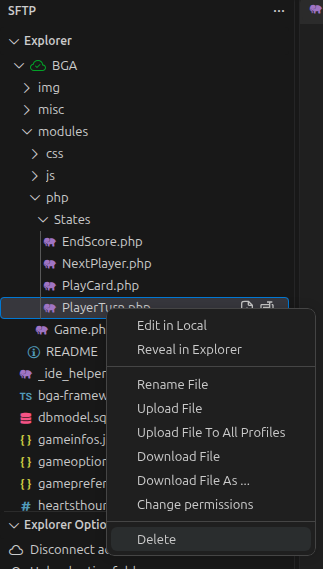
Try Express Start again. This time, it should work. Go to the game and keep it open for now.
Adapt the front-end state
The front-end example tells the player to play a card or pass, but in this game you cannot pass.
This text is set in the onEnteringState function, which is called every time we enter the state. The active player sees "You" instead of "[player name]". Let's change it to:
    onEnteringState(args, isCurrentPlayerActive) {
        this.bga.statusBar.setTitle(isCurrentPlayerActive ?
            _('${you} must play a card') :
            _('${actplayer} must play a card')
        );
    }
We will add a temporary action to simulate a turn and use it as the basis for the real action later. Replace the if (isCurrentPlayerActive) { example with this:
        if (isCurrentPlayerActive) {
            this.bga.statusBar.addActionButton(
                _('Play card'),
                () => this.bga.actions.performAction("actPlayCard", { id: 1 }),
            );
        }

Let's look at the code we added:
- The first parameter,
_('Play card'), is the button label. Wrapping it in_()marks it as translatable in BGA's translation system. Players using another language will see the translated label. - The second parameter is the callback triggered when the player clicks the button. Here, we call a game action named
actPlayCard(all action names must start withact) and send it some parameters. For now, this is a fixed example value.
If you click the button, you should see an error. The back-end state defines which actions the front end can use. The skeleton already has an actPlayCard action, but its parameters don't match the ones we send from the front end. Let's fix that!

Adapt the back-end state
Delete the actPass function, which we won't use, then replace actPlayCard with this:
    #[PossibleAction]
    public function actPlayCard(int $id, int $activePlayerNo)
    {
        throw new UserException("actPlayCard called by player $activePlayerNo with id=$id");
        return NextPlayer::class;
    }
#[PossibleAction] attribute tells BGA that this action is allowed in the current state. Refresh to give the front end the updated list of actions, then click the button again. You should now see the exception.

The parameter names must match the ones sent in the performAction call so BGA can map them automatically. BGA also fills in int $activePlayerNo automatically, based on its name. This is the player's position in the turn order, starting at 1. The order is random, so it won't necessarily match the number in your account name.
Comment out the throw new UserException line. Now, clicking the button takes the game to the NextPlayer state. The return value of an action function tells the state machine which state to enter next.
The NextPlayer class gives extra time to a player to compensate for their action, activates the next player, then redirects to PlayCard (or EndScore if the game is over). Nothing to change here.
Clicking the button now takes us to NextPlayer, which activates the next player and redirects to PlayCard again. You can test this on Studio using the red arrows. For now, it's an endless loop, as our action does nothing and we haven't set an end condition yet.
Show the player zones
When you start a table, you see placeholders for player zones. In Hearts, that's where we will show the played cards.
In the JS Game class, replace the block under // Setting up player boards with:
        // Setting up player zones
        Object.values(gamedatas.players).forEach(player => {
            const playerNo = this.bga.players.getPlayerNoById(Number(player.id));
            document.getElementById('player-tables').insertAdjacentHTML('beforeend', `
                <div id="player-${playerNo}-zone" class="player-table whiteblock">
                    <strong>${this.bga.players.getFormattedPlayerName(Number(player.id))}</strong>
                    <div>Played card goes here</div>
                </div>
            `);
        });
.player-table element for each player, with their name and a placeholder for their played cards.
Let's add a bit of styling:
#player-tables {
    display: flex;
    justify-content: center;
    align-items: stretch;
    gap: 20px;
}

.player-table {
    padding: 10px;
}
Refresh the page. You should see the player zones in a row, with each player's name in their color.

It would be nicer to arrange them in a circle, as if we were sitting around a table, but a row will do for this tutorial.
Show the player's hand
We will also need to display the player's hand.
Place this after the code creating the player zones:
        // Display the player hand
        if (!this.bga.players.isCurrentPlayerSpectator()) {
            document.getElementById('player-tables').insertAdjacentHTML('afterend', `
                <div class="player-hand whiteblock">
                    <strong>${_('Your hand')}</strong>
                    <div>Hand cards goes here</div>
                </div>
            `);
        }
We only display a hand if the current player is not a spectator. Spectators can watch a running table, but they aren't playing, so they don't have a hand of cards to display. Each player should only see their own hand, so we need to make sure we don't send private data to other players! We will handle that later.
You can test spectator mode by clicking the red arrow in the Spectator box:
You will see the player zones, but you won't see the hand section in this view.
Add the cards
The player's hand is empty, but we need to deal cards at the beginning of the game. We will create the cards in the setupNewGame function of the PHP Game class. We will use BGA's ItemManager library, which lets you store and manage game items without writing SQL.
We are changing the game setup, so close your table with Express Stop if one is running. We'll start a new one after this step to check that the setup works as expected.
Even though the game is small, let's put the code for managing the cards in a separate class. This shows how to split up PHP code, and it's a good habit!
Create a Cards folder in modules/php. Inside it, create this file:
<?php
declare(strict_types=1);
namespace Bga\Games\<your project name>\Cards;

use \Bga\GameFramework\Components\ItemManager\Item;
use \Bga\GameFramework\Components\ItemManager\ItemField;
use \Bga\GameFramework\Components\ItemManager\ItemFieldKind;

#[Item]
class Card {
    #[ItemField(kind: ItemFieldKind::ID)]
    public int $id;

    #[ItemField(kind: ItemFieldKind::LOCATION, locationIndex: 0)]
    public string $location;

    #[ItemField(kind: ItemFieldKind::LOCATION, locationIndex: 1)]
    public int|null $locationArg;

    #[ItemField(kind: ItemFieldKind::ORDER)]
    public int $order;

    #[ItemField]
    public int $suit;

    #[ItemField]
    public int $value;
}
?>
<your project name> with your project name.
This class describes a Card item for the ItemManager. Each item has an ID, location and order. These fields are required by the ItemManager.
It also adds a locationArg field, which lets us distinguish groups of cards in the same location, such as cards in different players' hands.
We also add our custom suit and value fields to identify each card.
Now, create our card manager in the same folder:
<?php
declare(strict_types=1);

namespace Bga\Games\<your project name>\Cards;

use Bga\GameFramework\Components\ItemManager\ItemManager;
use Bga\GameFramework\Components\ItemManager\ItemLocation;
use Bga\GameFramework\Helpers\Collection;
use Bga\Games\<your project name>\Game;

final class CardLocation {
    public const DECK = 'deck';
    public const HAND = 'hand';

    private function __construct() {}
}

class CardManager {
    /** @var ItemManager<Card> */
    public ItemManager $items;

    private \Bga\GameFramework\Bga $bga;

    function __construct(
        protected Game $game,
    ) {
        $this->bga = $game->bga;

        $this->items = $this->bga->itemManagerFactory->createItemManager(
            Card::class,
            locations: [
                new ItemLocation(CardLocation::DECK),
                new ItemLocation(CardLocation::HAND),
            ],
        );
    }

    /**
     * Create the table for the items, based on the item class #[Item].
     */
    public function initDb(): void {
        $this->items->initDb();
    }
}
This class sets up the ItemManager to use Card as its item class, with 2 possible locations: deck and hand.
Now let's declare it and use it in the Game class.
class Game extends \Bga\GameFramework\Table {
    public CardManager $cardManager;

    public function __construct() {
        parent::__construct();
        $this->cardManager = new CardManager($this);
    }
$CARD_TYPES and $playerEnergy properties, both their declarations and their setup in the constructor. They are examples that we won't use in this tutorial.
Place your cursor just after public CardManager, which is underlined in red, and press Ctrl+Space, then Enter. This adds the use line for you.
We don't need to require_once the CardManager file, as it is loaded automatically.
Autoloader
For autoloading to work, we follow the PSR-4 standard. Your folder and file structure must match the namespace and class name, as shown in our example.
In the setupNewGame function, also replace the playerEnergy->initDb line with:
    protected function setupNewGame($players, $options = []) {
        $this->cardManager->initDb();
Now we need to create the cards during game setup:
    /**
     * Creates the 52 cards.
     */
    public function setup() {
      $cards = [];
        foreach ([1, 2, 3, 4] as $suit) { // spade, heart, diamond, club
            for ($value = 2; $value <= 14; $value++) { // 2, 3, 4, ... K, A
                $cards[] = ['location' => 'deck', 'suit' => $suit, 'value' => $value];
            }
        }

        $this->items->createItems($cards);
        // shuffle the cards in the deck
        $this->items->shuffle(CardLocation::DECK);
    }

    /**
     * Deal cards to player hands.
     */
    public function dealCards() {
        $playerNos = array_values(array_map(fn($player) => (int)$player['player_no'], $this->game->loadPlayersBasicInfos()));
        $cardsPerPlayer = intdiv($this->items->countItemsInLocation(CardLocation::DECK), count($playerNos));

        foreach ($playerNos as $playerNo) {
            // give this player $cardsPerPlayer (from the shuffled deck to the player hand)
            $this->items->pickItems($cardsPerPlayer, [CardLocation::DECK], [CardLocation::HAND, $playerNo]);
        }
    }
In the Game class, call this setup method by replacing // TODO: Setup the initial game situation here. with:
Start a new game to make sure everything works as expected.
If you kept $this->playerEnergy->fillResult($result); in getAllDatas, you may get an error. Remove it and try starting a new table again.
Explore the database
You won't see any changes in the game yet, as we have only set up the PHP side. You can inspect the database for this table by clicking Go to game database.
Log in with the credentials you received by email.
You'll see a Card table created by the ItemManager from our item class name, with columns for all the #[ItemField] fields. The cards should be in the hand location, with locationArg values from 1 to 4 if you started a 4-player table. The hands have been dealt!
You can close the database tab and come back at any time to check that the data matches your expectations. You can also edit the values directly, but we will explore easier ways to change the game state later.
Send the cards to the front end
Create a function in CardManager to return the cards in a player's hand:
    /**
     * @return Collection<Card>
     */
    public function getPlayerHand(int $playerNo): Collection {
        return $this->items->getItemsInLocation([CardLocation::HAND, $playerNo]);
    }
The Game class has a function called getAllDatas, which returns the data the front end needs to display the current game state. Send it the hand data by replacing // TODO: Gather all information about current game situation (visible by player $currentPlayerId). with:
        if ($currentPlayerNo !== null) {
            $result['hand'] = $this->cardManager->getPlayerHand($currentPlayerNo)->values();
        }
In the getAllDatas signature, replace int $currentPlayerId with ?int $currentPlayerNo. BGA will fill this parameter with the player number of the player viewing the table, or null for a spectator.
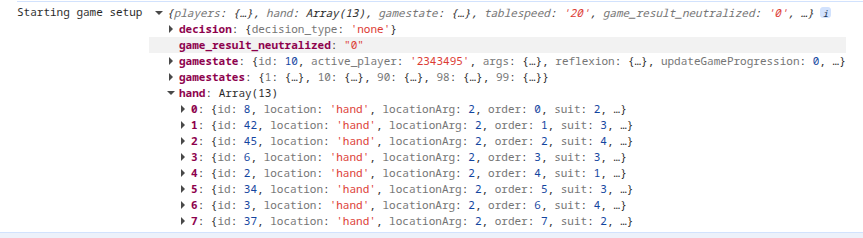
Open the Console tab in the DevTools (F12) and refresh the page. Expand the object on the Starting game setup line. You should see the hand entry we added in getAllDatas, with the cards dealt during setup to the player. Now we need to display them!
Display the cards
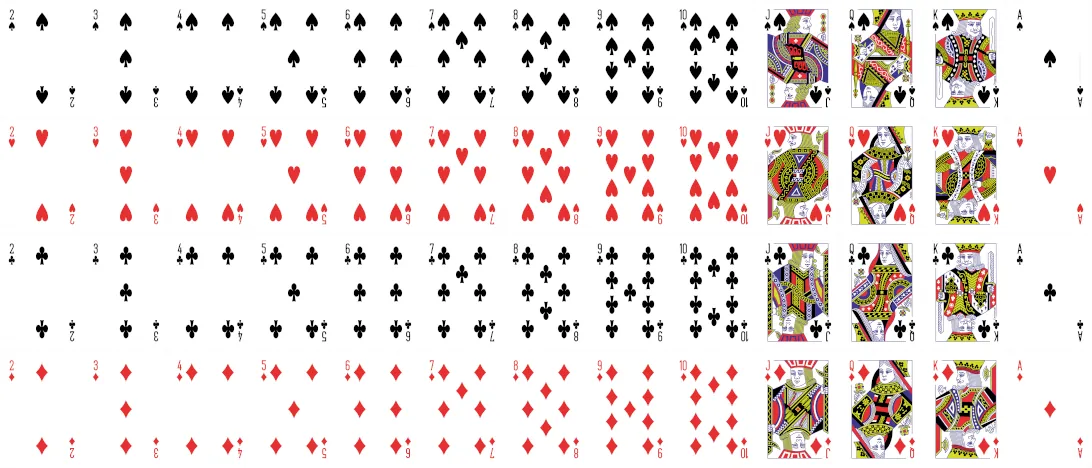 Download this file into your
img directory. In VSCode, right-click it and choose Upload file to send it to the FTP server. Auto-upload handles files saved in VSCode, but files added outside the editor need to be uploaded manually.
We use a single sprite file for all card images to reduce the number of image files.
We will use the BgaCards library to display the cards, along with BgaAnimations, which BgaCards requires.
At the very top of the Game.js file, add:
Download the d.ts file from the BgaCards documentation to your project root.
Uncomment the lines related to BgaAnimations and BgaCards in libs.ts, then add import { BgaAnimations, BgaCards } from "./libs"; at the start of Game.ts.
This tells BGA to wait for version 1.x of the libraries to load before continuing to load the game.
At the start of the Game setup function, create the animation manager:
        this.animationManager = new BgaAnimations.Manager({
            animationsActive: () => this.bga.gameui.bgaAnimationsActive(),
        });
        this.cardManager = new CardManager(this);
We defined a CardManager class, but it's not the BgaCards.Manager class from the library!
We will extend BgaCards.Manager to create our own CardManager class, which describes how to display the cards.
Add this before the declaration of the PlayCard state:
class CardManager extends BgaCards.Manager {
    constructor(game) {
        super({
            animationManager: game.animationManager,
            type: 'hearts-card',
            setupFrontDiv: (card, div) => {
                // (nx, ny) : indices in sprite
                var nx = card.value - 2;
                var ny = card.suit - 1;
                div.style.backgroundPosition = `${nx * 100 / 12}% ${ny * 100 / 3}%`;
            },
            cardWidth: 84,
            cardHeight: 117,
            cardBorderRadius: '4px',
            isCardVisible: (card) => !!card.suit,
        });
    }
}
CardManager.ts that imports the library, then import the new class in Game.ts.
.hearts-card .bga-cards_card-side {
    background-image: url('img/cards.webp');
    background-size: 1300% 400%;
}
Add JSDoc at the top of your file if you want type information in your code:
/**
* @typedef {Object} Card
* @property {number} id
* @property {number} suit
* @property {number} value
*/

/**
* @typedef {Gamedatas<Player> & {
*     hand: Card[]
* }} HeartsGamedatas
*/
CardManager functions:
That took a few steps, but now our CardManager knows how to display the cards!
Now we need to display the cards in the hand. Update the block where we display "Your hand". Notice that we replace the placeholder with an empty div that has an ID:
        // Display the player hand
        if (!this.bga.players.isCurrentPlayerSpectator()) {
            document.getElementById('player-tables').insertAdjacentHTML('afterend', `
                <div class="player-hand whiteblock">
                    <strong>${_('Your hand')}</strong>
                    <div id="myhand"></div>
                </div>
            `);
            this.playerHand = new BgaCards.HandStock(this.cardManager, document.getElementById('myhand'));
            this.playerHand.addCards(gamedatas.hand);
        }
This creates a HandStock using our cardManager, with the myhand element as its container.
We then add the cards from gamedatas.hand, and the library takes care of displaying them.
Sorting the hand
The bga-cards library can sort the hand automatically. To sort the cards, pass these stock settings as the third parameter of the HandStock constructor:
``` js title="modules/js/Game.js"
Refresh the page. You should see the current player's hand!
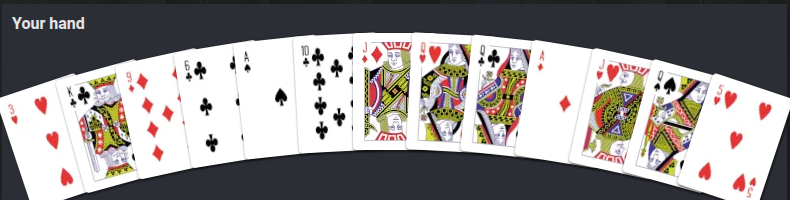
If you open another player's view with the red arrow, you will see their hand instead.
Display allowed cards
We will create a PHP function called getPlayableCards to show the current player which cards in their hand they can play.
Compute the possible moves
Copy this method into CardManager:
    /**
     * @return Collection<Card>
     */
    public function getPlayableCards(int $playerNo): Collection {
        // Get all data needed to check playable cards at the moment
        $currentTrickSuit = $this->bga->globals->get(TRICK_SUIT, null);
        $hand = $this->getPlayerHand($playerNo);

        $playableCards = $hand->filter(fn($card) => $currentTrickSuit === null || $card->suit === $currentTrickSuit);

        if (!$playableCards->isEmpty()) {
            // we can play the required suit
            return $playableCards;
        }
        // we can't, so play any card
        return $hand;
    }
bga->globals is a BGA API for storing any type of data. Here, we will store the suit of the current trick as a number, or null if no card has been played in this trick yet.
At the top of the CardManager class, add a constant for the global key:
Send the possible moves to the front end
Replace the PlayCard class's getArgs function with this one to send the active player's possible moves to the front end:
    public function getArgs(int $activePlayerNo): array {
        return [
            "playableCards" => $this->game->cardManager->getPlayableCards($activePlayerNo)->values(),
        ];
    }
In the JavaScript Game class, uncomment:
Refresh the page and expand the object on the onEnteringState PlayCard line. You should see the arguments sent by getArgs, including the possible cards we computed.
Whenever possible, we do the calculations in PHP and keep the front end simple. The front end relies on the back end for the list of possible cards.
Display the possible cards
Add JSDoc at the top of your file if you want type information in your code:
Update the PlayCard definition with this type information:
In PlayCard.onEnteringState, enable selection for the cards the active player can play:
        if (isCurrentPlayerActive) {
            this.game.playerHand.setSelectionMode('single', args.playableCards);
        }
PlayCard.onLeavingState, disable card selection:
Refresh the page to see the playable cards. Make sure you're on the active player's tab. The cursor should change to a hand over the cards, and clicking a card should select it.
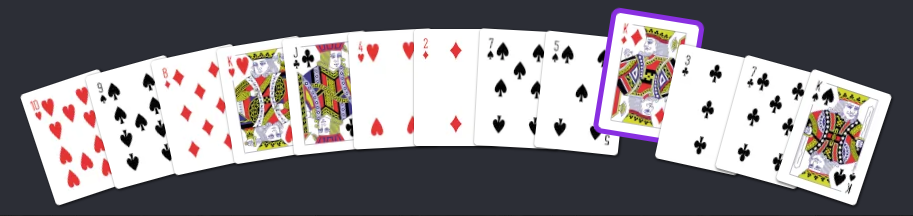
All cards are selectable at the start of a trick, so we can't yet tell whether getPlayableCards filters them correctly.
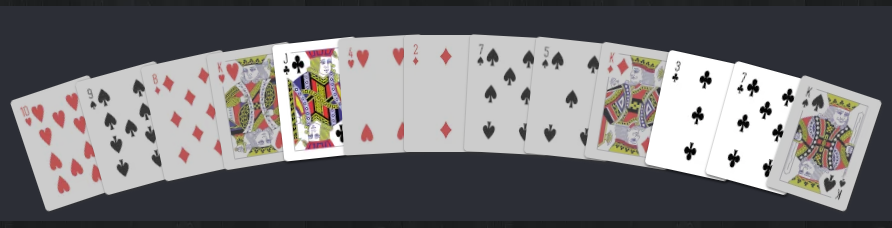
Open the debug menu at the top right, then click Globals:
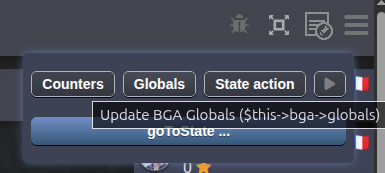
Click Add int and set the global key TrickSuit to a number between 1 and 4:
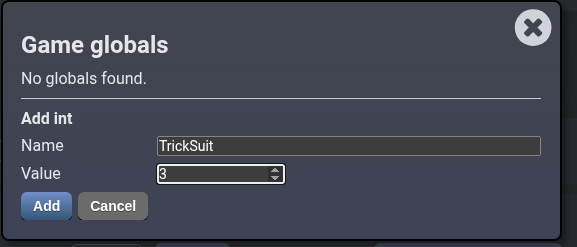
Refresh the page. Cards of the matching suit should be selectable, and the others should be disabled:
Trigger an action on card click
We can select the cards, but we want to play them!
In the PlayCard class, replace the onCardClick function with:
    /**
     * When the player clicks on a card in their hand.
     *
     * @param {Card} card
     */
    onPlayCard(card) {
        if (!this.args.playableCards.find(c => c.id === card.id)) {
            return;
        }
        this.bga.actions.performAction("actPlayCard", { id: card.id });
    }
actPlayCard with the ID of the selected card.
Just after creating our hand in the Game setup function, connect card clicks to the new function:
this.playerHand.onCardClick = card => this.bga.states.getCurrentMainStateClass().onPlayCard?.(card);
Uncomment the exception in the PHP state class.
Refresh and click on a selectable card. You should see the exception with the ID of the card you clicked.
Save the played card
Update actPlayCard to:
- Check that the move is valid. Never trust the front end, as a player can send a manually crafted request. Always check on the PHP side, even if the front end also checks.
- Save the played card and store the trick suit if needed.
- Later, notify the front end of the change.
We added array $args. Based on this name, BGA automatically fills it with the return value of getArgs.
    #[PossibleAction]
    public function actPlayCard(int $id, int $activePlayerNo, array $args) {
        // check if this is a possible move
        $card = array_find($args['playableCards'], fn($possibleCard) => $possibleCard->id === $id);
        if (!$card) {
            throw new UserException(clienttranslate("Impossible move"));
        }

        // Let's play the card
        $this->game->cardManager->playCard($activePlayerNo, $card);

        // Then, go to the next state
        return NextPlayer::class;
    }
Now we must implement the playCard function:
    /**
     * Play a card and update the trick suit if necessary
     *
     * @param int $playerNo
     * @param Card $card
     */
    public function playCard(int $playerNo, Card $card): void {
        $this->items->moveItem($card, [CardLocation::PLAYED, $playerNo]);

        if ($this->bga->globals->get(TRICK_SUIT, null) === null) {
          $this->bga->globals->set(TRICK_SUIT, $card->suit);
        }
    }
public const PLAYED = 'played'; to CardLocation, then add new ItemLocation(CardLocation::PLAYED), to the locations handled by the item manager.
On the active player's tab, click a playable card. Nothing appears yet because we haven't notified the front end. Refresh the page. The card you clicked should have disappeared from your hand, as it is now in the played location.
You can return to the situation before your move using "Load previous state". You can also save a game situation in 3 different slots and load it at any time.

Update the zombie function
The zombie function is called when a player must make a move but has left the game. We usually play a random possible move so the game can continue.
    function zombie(int $playerNo, array $args) {
        $zombieChoice = $this->getRandomZombieChoice($args['playableCards']);
        return $this->actPlayCard($zombieChoice->id, $playerNo, $args);
    }
Save the current situation with Save 1. Open the debug menu at the top right, then click the arrow icon a few times. This plays a zombie move for the active player, so we can test without using the front-end actions. Refresh to see that cards have disappeared from your hand! Click Load 1 to return to the saved situation.
Display the played card
In the actPlayCard function, after the call to cardManager->playCard, send a notification to all players. This lets the front end place the played card in the player zone:
        // Notify
        $this->bga->notify->all("playedCard", clienttranslate('${player_name} plays a ${card_name}'), [
            'playerNo' => $activePlayerNo,
            'card' => $card,
        ]);
If you click a possible card, you will see a playedCard entry in the Input / Output section, but you will also get this error message:
Invalid or missing substitution argument for log message: ${player_name} plays a ${card_name}: string.substitute could not find key "player_name" in template.
Use Load previous state to return to the situation before the error.
In the Game constructor (__construct), add:
    $this->bga->notify->addDecorator(function(string $message, array $args) {
        if (isset($args['playerNo']) && !isset($args['player_name']) && str_contains($message, '${player_name}')) {
            $args['player_name'] = $this->getPlayerNameByNo($args['playerNo']);
        }

        if (isset($args['card']) && !isset($args['card_name']) && str_contains($message, '${card_name}')) {
            $args['card_name'] = SUITS[$args['card']->suit].VALUES[$args['card']->value];
        }

        return $args;
    });
const SUITS = [
    1 => '♠',
    2 => '♥',
    3 => '♣',
    4 => '♦',
];

const VALUES = [
    2 => '2',
    3 => '3',
    4 => '4',
    5 => '5',
    6 => '6',
    7 => '7',
    8 => '8',
    9 => '9',
    10 => '10',
    11 => 'J',
    12 => 'Q',
    13 => 'K',
    14 => 'A'
];
This tells the notify object to add player_name to the notification arguments when the message needs it and we have only sent playerNo. BGA finds the name from playerNo, so we do not have to send both values every time.
We do the same for card_name, using the card object to build a readable card name.
The player_name parameter
When BGA sees a notification argument with this name (optionally followed by a digit), it displays it in bold and in the player's color.
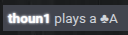
Try the action again. You should now see the notification message in the game log.
Remember, after a test you can return to the previous situation with Load previous state.
Show the played card
Uncomment this line in modules/js/Game.js:
Then replace the commented-out notif_cardPlayed example with:
    async notif_playedCard(args) {
        await this.playedCards[args.playerNo].addCard(args.card);
    }
async keyword lets the framework wait for one notification to finish before handling the next one. This keeps their animations from overlapping.
Add JSDoc if you want type information in your code:
/**
 * Place the played card on the player zone.
 *
 * @param {Object} args Notification data sent by the playedDisc notification.
 * @param {number} args.playerNo Player who played the card.
 * @param {Card} args.card the played card.
 * @returns {Promise<void>}
 */
async notif_playedCard(args)
Using async and await makes the notification wait until the card is fully added before unlocking the BGA interface and allowing the next move.
Update the player zone setup to replace each placeholder with a LineStock displaying that player's played card:
            document.getElementById('player-tables').insertAdjacentHTML('beforeend', `
                <div id="player-${playerNo}-zone" class="player-table whiteblock">
                    <strong>${this.bga.players.getFormattedPlayerName(Number(player.id))}</strong>
                    <div id="player-${playerNo}-played-card" class="played-card"></div>
                </div>
            `);
            this.playedCards[playerNo] = new BgaCards.LineStock(this.cardManager, document.getElementById(`player-${playerNo}-played-card`));
At the beginning of the Game class, add:
We now have one LineStock per player. The notification handler adds the played card to the corresponding player's stock.
The card manager makes sure each card only appears once. If the card is already in the player's hand, adding it to the LineStock moves it out of the hand. In other players' views, where the card wasn't visible, the card manager creates it.
Refresh and play a card. You should see it move from your hand to your player zone.
You will also see the layout shift. The empty LineStock takes up no space by default, so it grows when we add a card.
Add this to your CSS so the zone is the size of a card:
Use Load previous state, then try playing the card again. This time, the layout should stay in place. Much better!
If you refresh after playing a card, it disappears from the player zone because we don't send it in getAllDatas. This function should return everything needed to display the current game state, so we need to include the played cards!
Add a function in CardManager to get the played cards:
/**
     * @return Collection<Card>
     */
    public function getPlayedCards(): Collection {
        return $this->items->getItemsInLocation([CardLocation::PLAYED]);
    }
In getAllDatas, add:
$currentPlayerNo !== null condition, because played cards are public data that spectators can see too.
Just after creating each LineStock, add:
this.playedCards[playerNo].addCards(gamedatas.playedCards.filter(card => card.locationArg === playerNo));
LineStock. Each player will have either 0 or 1 played cards.
Add locationArg and playedCards to the typedef:
Handle the end of a trick
Save the current situation with Save 1. Open the debug menu at the top right, then click the arrow icon until all players but one have played a card. Save this situation with Save 2. If you keep playing, you'll see a player with 2 played cards, even though the trick should end once everyone has played one card. Click Load 2 to return to the moment just before the trick should end.
Create a new file/class to handle the end of a trick:
<?php
declare(strict_types=1);

namespace Bga\Games\hearts<yournickname>\States;

use Bga\GameFramework\StateType;
use Bga\Games\hearts<yournickname>\Game;

class EndTrick extends \Bga\GameFramework\States\GameState {
    function __construct(
        protected Game $game,
    ) {
        parent::__construct($game,
            id: 20,
            type: StateType::GAME,
        );
    }

    public function onEnteringState() {
        // remove the played cards
        [$playerNo, $points] = $this->game->cardManager->endTrick();

        // Notify
        $this->bga->notify->all("endTrick", clienttranslate('${player_name} captures the trick (${points} in the trick)'), [
            'playerNo' => $playerNo,
            'points' => $points,
        ]);

        return PlayCard::class;
    }
}
Update the NextPlayer state to go to EndTrick when necessary. Replace the example condition with this:
        if ($this->game->cardManager->getPlayedCards()->count() === $this->game->getPlayerCount()) {
            return EndTrick::class;
        } else {
            return PlayCard::class;
        }
EndTrick state.
Now play the last card of the trick, either with the debug arrow button or by clicking a card in the active player's view. You should see an error because we haven't written cardManager->endTrick yet: Call to undefined method Bga\Games\hearts<yournickname>\Cards\CardManager::endTrick().
Add it:
    /**
     * Capture the trick and let its winner lead the next one.
     *
     * @return array{int, int} Winner's player number and penalty points.
     */
    public function endTrick(): array {
        $cards = $this->getPlayedCards();
        $trickSuit = $this->bga->globals->get(TRICK_SUIT, null);
        $winnerCard = null;
        $points = 0;

        foreach ($cards as $card) {
            if ($card->suit === $trickSuit && ($winnerCard === null || $card->value > $winnerCard->value)) {
                $winnerCard = $card;
            }

            if ($card->suit === 2) {
                $points++;
            } elseif ($card->suit === 1 && $card->value === 12) {
                $points += 13;
            }
        }

        if ($winnerCard === null) {
            throw new SystemException('Cannot end a trick without a card of the led suit and its player.');
        }

        $playerNo = $winnerCard->locationArg;
        $this->items->moveItems($cards, [CardLocation::CAPTURED, $playerNo]);
        $this->bga->globals->delete(TRICK_SUIT);
        $this->game->gamestate->changeActivePlayer($this->game->getPlayerIdByNo($playerNo));

        return [$playerNo, $points];
    }
captured location to CardLocation and the item manager locations, just as we did for played.
We find the card that wins the trick and calculate the penalty points in the trick.
We move the played cards to the captured location, delete the TRICK_SUIT global so the next trick can start with any suit, and make the trick winner the active player.
Now add a notif_endTrick notification handler to remove the played cards:
    async notif_endTrick(args) {
        await Promise.all(this.playedCards.map(playedCardStock => playedCardStock.removeAll()));
    }
map calls removeAll on each stock and collects the returned promises. Promise.all lets the removals run at the same time and waits for all of them to finish.
Add JSDoc if you want type information in your code:
Now, playing the last card of a trick clears the player zones, but the only way to see who won the trick is to read the game log. Let's make that clearer!
Update the notif_endTrick function:
    async notif_endTrick(args) {
        const winnerZone = document.getElementById(`player-${args.playerNo}-zone`);

        winnerZone.classList.add('trick-winner');

        await this.bga.gameui.wait(1000);

        await Promise.all(this.playedCards.map(playedCardStock => playedCardStock.removeAll()));

        winnerZone.classList.remove('trick-winner');
    }
trick-winner class to that player's zone, wait 1 second, remove the cards, then remove the class.
Add the CSS class:
Try playing the last card of the trick again. The winner's zone should get a gold outline, then the cards and the outline should disappear. That's better, but we can still improve it!
Add this line just before the creation of this.playedCards[playerNo]:
this.voids[playerNo] = new BgaCards.VoidStock(this.cardManager, document.querySelector(`#player-${playerNo}-zone strong`));
voids = []; as a Game property, just as we did for playedCards.
A VoidStock automatically removes cards added to it once their animation finishes. We attach one to the player name element in each player zone.
Instead of removing the played cards directly, we will move them to the trick winner's VoidStock.
Replace the Promise.all line that removes the played cards with:
        const trickCards = [];
        this.playedCards.forEach(playedCardStock => trickCards.push(...playedCardStock.getCards()));
        await this.voids[args.playerNo].addCards(trickCards, { fromPlaceholder: 'off', toPlaceholder: 'off', });
VoidStock.
Play the last move of the trick again. You should see the captured cards move toward the trick winner's name.
Update the score
We will update the score in the player panel when a trick is captured, using the predefined bga->playerScore PlayerCounter.
In the Game constructor (__construct), add:
playerScore counter to use playerNo instead of playerId.
After sending the endTrick notification in the EndTrick state, update the score with the returned $points value.
        if ($points !== 0) {
            $this->bga->playerScore->inc($playerNo, $points); // this will update the JS counter automatically
        }
You may need to play several tricks to test this, as some tricks are worth 0 points.
In Hearts, the player with the fewest points at the end of the game wins. By default, BGA ranks the player with the most points first, so we need to reverse the score order.
In the EndScore state, replace the return ST_END_GAME; line with:
Handle the end of a round
Create a new file and class to handle the end of a round, just as we did for the end of a trick:
<?php
declare(strict_types=1);

namespace Bga\Games\hearts<yournickname>\States;

use Bga\GameFramework\StateType;
use Bga\Games\hearts<yournickname>\Game;

class EndRound extends \Bga\GameFramework\States\GameState {

    function __construct(
        protected Game $game,
    ) {
        parent::__construct($game,
            id: 30,
            type: StateType::GAME,
        );
    }

    public function onEnteringState() {
        if ($this->bga->playerScore->getMax() >= 100) {
            return EndScore::class;
        }

        $this->game->cardManager->resetDeck();
        $dealtCards = $this->game->cardManager->dealCards();

        // Notify
        $private = [];
        foreach ($dealtCards as $playerNo => $newHand) {
            $private[$playerNo] = [
                'hand' => $newHand->values(),
            ];
        }
        $this->bga->notify->all("dealtCards", clienttranslate('A new round starts'), [
            '_private' => $private
        ]);

        return PlayCard::class;
    }
}
In EndTrick, add this just before the return to redirect to the new state when needed:
        if ($this->game->cardManager->getPlayerHand($playerNo)->isEmpty()) {
            return EndRound::class;
        }
EndRound. Otherwise, we continue to PlayCard as before.
Let's go back to what we did in the new EndRound state.
If a player has reached 100 points, the game is over and we go to the EndScore state.
Otherwise, we ask the card manager to return all cards to the deck and shuffle them, then deal new hands for the next round.
The first call to dealCards happens during game setup, before anyone has loaded the game page. We don't need to send a notification then, as players receive their hands through getAllDatas when the page loads. For later rounds, the page is already open, so we need to send each player their new hand without revealing it to anyone else. We use the special _private key in the notification arguments for this.
The _private array should contain an entry for each player number that needs extra notification arguments. Here, each player receives a hand argument with their own cards. Spectators receive no private arguments.
In the Game constructor (__construct), add:
playerNo instead of playerId and to merge private arguments directly into the front-end args object. We can then read args.hand without going through a _private object. This only affects the front end; the PHP arguments stay the same.
Update dealCards by replacing the foreach block with:
        $dealtCards = [];
        foreach ($playerNos as $playerNo) {
            // give this player $cardsPerPlayer (from the shuffled deck to the player hand)
            $dealtCards[$playerNo] = $this->items->pickItems($cardsPerPlayer, [CardLocation::DECK], [CardLocation::HAND, $playerNo]);
        }
        return $dealtCards;
_private argument.
Also add a resetDeck function to move all cards back to the deck and shuffle it for the next round:
    public function resetDeck() {
        $this->items->moveAllItemsInLocation(null, "deck");
        $this->items->shuffle('deck');
    }
To test this, we need to reach the end of a round.
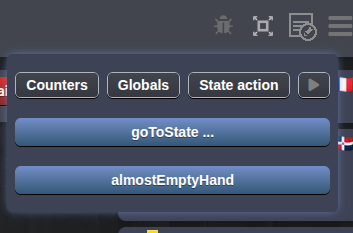
Instead of doing it manually, we will use a debug function!
Replace the commented-out debug_setCardInHand example with:
    #[Debug(reload: true)]
    public function debug_almostEmptyHand() {
        $playerNos = array_values(array_map(fn($player) => (int)$player['player_no'], $this->loadPlayersBasicInfos()));

        foreach ($playerNos as $playerNo) {
            $hand = $this->cardManager->getPlayerHand($playerNo);
            $this->cardManager->items->moveItems($hand->slice(1), CardLocation::DECK);
        }
    }
#[Debug(reload: true)] attribute tells Studio to reload the page automatically when we call this function, so we can immediately see the updated hand.
Refresh the page, open the debug menu, then click the new debug button to call the function.
Use the debug arrow until all players but one have played. Click Save 1, then play the last move.
We see "A new round starts" in the log, but we still need to refresh to see our new hand. Let's handle the dealtCards notification:
    async notif_dealtCards(args) {
        if (args.hand) {
            this.playerHand.addCards(args.hand);
        }
    }
Add JSDoc if you want type information in your code:
We check whether args.hand is set because players receive this argument, but spectators do not.
Spectators and private data
When working with private data, it's a good habit to check that the spectator view works and doesn't receive private information.
Open the spectator view in a new tab with the red arrow, then open the console in both the player and spectator views.
Play the last move. In the console, you should see empty notification arguments for the spectator and a hand argument for the player. The player's hand should now fill from the notification.
Implement the game progression
The BGA framework expects getGameProgression to return the progress of the game as a number from 0 to 100.
Update the existing function:
    public function getGameProgression() {
        return $this->bga->playerScore->getMax();
    }
Special case
In our case, the closer a player gets to 100 points, the closer the game is to ending, so the progress function is simple. For a different target score, such as 75 points, we would need to convert the score to a percentage of that target (for example return $this->bga->playerScore->getMax() * 75 / 100). You will often need this kind of calculation, as game objectives rarely match 100 exactly.
We also need to tell the framework when to update game progression. The NextPlayer class already has the updateGameProgression flag enabled, but our progress only changes in EndTrick, so move the flag to that state.
Add some statistics
Replace the contents of stats.jsonc with:
{
    "table": {
        "rounds": {
            "id": 10,
            "name": "Number of rounds",
            "type": "int"
        }
    },
    "player": {
        "getQueenOfSpades": {
            "id": 10,
            "name": "Captured Queens of Spades",
            "type": "int"
        },
        "getHeart": {
            "id": 11,
            "name": "Captured Heart cards",
            "type": "int"
        },
        "getNoPoints": {
            "id": 12,
            "name": "Tricks with no penalty points",
            "type": "int"
        }
    }
}
In the Game constructor (__construct), add:
playerStats object to use playerNo instead of playerId.
In setupNewGame, replace the placeholder comment // Init game statistics. with:
        $this->tableStats->init(['rounds'], 0);
        $this->playerStats->init(['getQueenOfSpades', 'getHeart', 'getNoPoints'], 0);
In CardManager, update the table statistic in the dealCards function:
dealCards starts a new round, so we increment the round count there.
Update endTrick to record the player statistics:
    public function endTrick(): array {
        $cards = $this->getPlayedCards();
        $trickSuit = $this->bga->globals->get(TRICK_SUIT, null);
        $winnerCard = null;
        $capturedHeartCount = 0;
        $capturedQueenOfSpadesCount = 0;

        foreach ($cards as $card) {
            if ($card->suit === $trickSuit && ($winnerCard === null || $card->value > $winnerCard->value)) {
                $winnerCard = $card;
            }

            if ($card->suit === 2) {
                $capturedHeartCount++;
            } elseif ($card->suit === 1 && $card->value === 12) {
                $capturedQueenOfSpadesCount++;
            }
        }

        if ($winnerCard === null) {
            throw new SystemException('Cannot end a trick without a card of the led suit and its player.');
        }

        $playerNo = $winnerCard->locationArg;
        $this->items->moveItems($cards, [CardLocation::CAPTURED, $playerNo]);
        $this->bga->globals->delete(TRICK_SUIT);
        $this->game->gamestate->changeActivePlayer($this->game->getPlayerIdByNo($playerNo));

        $points = $capturedQueenOfSpadesCount * 13 + $capturedHeartCount;
        if ($capturedQueenOfSpadesCount === 0 && $capturedHeartCount === 0) {
            $this->bga->playerStats->inc('getNoPoints', 1, $playerNo);
        } else {
            $this->bga->playerStats->inc('getQueenOfSpades', $capturedQueenOfSpadesCount, $playerNo);
            $this->bga->playerStats->inc('getHeart', $capturedHeartCount, $playerNo);
        }

        return [$playerNo, $points];
    }
To test the statistics, make a few moves manually or use the Play/arrow button in the debug menu. You can right-click the arrow button to make multiple moves at a time.
Then click goToState in the debug menu, select EndScore and click Apply. This takes the game to EndScore, which redirects to the game end and marks the table as complete.
In the Statistics section of the game results, you should see values for the statistics we added.
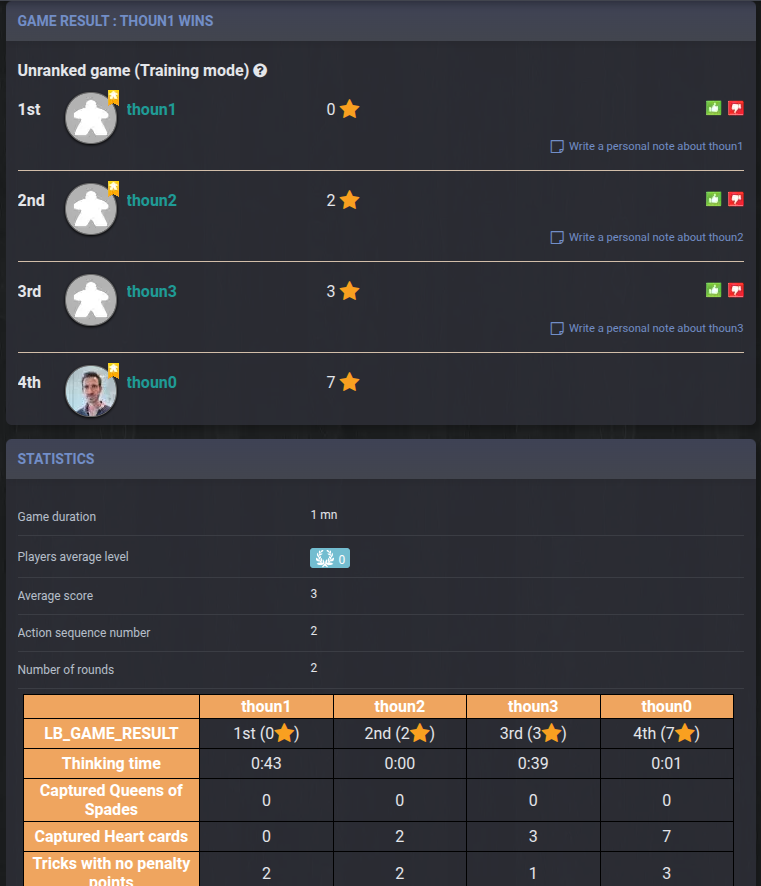
The debug_ functions
The goToState entry appears in the debug menu because we have a debug_goToState function in the PHP Game class. You can create as many debug functions as you like! See some examples.
Implement the variants
We now have a working game, so you can skip this section if you want.
In the introduction, we mentioned the common passing variant and the minor rule variant for the 2♣. Let's add them now!
The 2♣ minor variant
First player
When a rule says the youngest or oldest player starts, keeping BGA's random first player is perfectly fine.
Add this function to the CardManager:
    /**
     * Make the owner of the 2♣ the first player
     */
    private function activateRoundFirstPlayer(): void {
        $firstPlayerCard = $this->items->getItemsInLocation(CardLocation::HAND)->find(fn($card) => $card->suit === 3 && $card->value === 2);
        $this->game->gamestate->changeActivePlayer($this->game->getPlayerIdByNo($firstPlayerCard->locationArg));
    }
Just before the return in dealCards, add:
By default, the skeleton activates a player during setup. We now set the active player in dealCards, which is called from Game.setupNewGame, so remove $this->activeNextPlayer(); from setupNewGame.
The passing cards variant
Create the new file/class GiveCards:
<?php
declare(strict_types=1);

namespace Bga\Games\hearts<yournickname>\States;

use Bga\GameFramework\Actions\Types\IntArrayParam;
use Bga\GameFramework\StateType;
use Bga\GameFramework\States\GameState;
use Bga\GameFramework\States\PossibleAction;
use Bga\GameFramework\UserException;
use Bga\Games\hearts<yournickname>\Game;

class GiveCards extends GameState {
    function __construct(
        protected Game $game,
    ) {
        parent::__construct($game,
            id: 5,
            type: StateType::MULTIPLE_ACTIVE_PLAYER,
        );
    }

    public function onEnteringState() {
        $this->gamestate->setAllPlayersMultiactive();
    }

    function zombie(int $playerNo) {
    }
}
MULTIPLE_ACTIVE_PLAYER, so several players can be active at once. Everyone can choose their cards at the same time, and we only reveal the passed cards once all players have finished.
Active player
In a multiple active player state, the notion of active player means nothing. Make sure you never use activePlayerNo in those states, and use currentPlayerNo in the action parameters instead.
When we enter the state, we make all players active.
Create the corresponding front-end state. If you are using TypeScript, you can put it in a dedicated file:
class GiveCards {
    /**
     * @param {Game} game
     * @param {Bga} bga
     */
    constructor(game, bga) {
        this.game = game;
        this.bga = bga;
    }

    onPlayerActivationChange(args, isCurrentPlayerActive) {
        this.bga.statusBar.setTitle(isCurrentPlayerActive ?
            _('${you} must choose 3 cards to give to the player on your left') :
            _('All players must choose 3 cards to give to the player on their left')
        );

        this.game.playerHand.setSelectionMode(isCurrentPlayerActive ? 'multiple' : 'none');
        if (isCurrentPlayerActive) {
            this.button = this.bga.statusBar.addActionButton(
                _('Give the 3 selected cards'),
                () => this.bga.actions.performAction('actGiveCards', { ids: this.game.playerHand.getSelection().map(card => card.id) }),
                { disabled: this.game.playerHand.getSelection().length !== 3 }
            );
        }
    }
}
onPlayerActivationChange instead of onEnteringState.
When the player is active, we set the hand selection mode to multiple so they can select 3 cards.
The button lets the player confirm their choice. We disable it until exactly 3 cards are selected.
Register the new state in the constructor with:
At the end of setupNewGame, change the initial state:
EndRound.
If you start a new game, you should see the new state.
When setting up playerHand, add this just after the this.playerHand.onCardClick handler:
this.playerHand.onSelectionChange = selectedCards => this.bga.states.getCurrentMainStateClass().onCardSelectionChange?.(selectedCards);
In the GiveCards class, add this function:
    /**
     * When the player selects cards in their hand.
     *
     * @param {Card[]} selectedCards
     */
    onCardSelectionChange(selectedCards) {
        if (this.button) {
            this.button.disabled = selectedCards.length !== 3;
        }
    }
Now, selecting 3 cards should enable the button. Clicking it should try to send the IDs of the selected cards.
Add the action to the GiveCards state:
#[PossibleAction]
    function actGiveCards(#[IntArrayParam] array $ids, int $currentPlayerNo) {
        $cards = $this->game->cardManager->getPlayerHand($currentPlayerNo)->filter(fn($card) => in_array($card->id, $ids));
        if (count($cards) != 3) {
            throw new UserException("Some of these cards don't exist or are not in your hand");
        }

        $nextPlayer = (int)$this->game->getPlayerNoById($this->game->getPlayerAfter($this->game->getPlayerIdByNo($currentPlayerNo)));

        $this->game->cardManager->moveCardsToTemporary($cards, $nextPlayer);

        // Notify the player so we can make these cards disappear
        $this->notify->player($currentPlayerNo, "giveCards", clienttranslate('You passed 3 cards to ${player_name}'), [
            'player_name' => $this->game->getPlayerNameByNo($nextPlayer),
            'cards' => $cards->values(),
            'toPlayer' => $nextPlayer,
        ]);

        // Make this player inactive now
        // (and tell the machine state to use the transition returned by "takeCards" if all players are now inactive
        $this->gamestate->setPlayerNonMultiactive($this->game->getPlayerIdByNo($currentPlayerNo), PlayCard::class);
    }
cardManager to move the selected cards to a temporary location for the next player. Think of it as placing cards face down next to the player receiving them.
Instead of returning the next state, we call setPlayerNonMultiactive to make the player who just acted inactive. The second parameter gives the state to enter once all players are inactive.
Add this function to CardManager:
    /**
     * @param Collection<Card> $cards
     */
    public function moveCardsToTemporary(Collection $cards, int $forPlayerId): void {
        $this->items->moveItems($cards, [CardLocation::TEMPORARY, $forPlayerId]);
    }
Once the cards are in the temporary location, we need to remove them from the hand on screen. The giveCards notification handles this.
Note: We use notify->player($currentPlayerNo instead of notify->all, so this is a private notification sent only to that player.
Add the notification handler to remove the passed cards from the hand:
Don't forget the zombie function! It will choose 3 random cards to pass:
    function zombie(int $playerNo) {
        $cards = $this->game->cardManager->getPlayerHand($playerNo);
        $ids = $cards->pluck('id')->values();
        shuffle($ids);
        $zombieChoice = array_slice($ids, 0, 3);
        $this->actGiveCards($zombieChoice, $playerNo);
    }
Test this in the front end. Your 3 selected cards should disappear after you click the button. Do this manually for now, as the debug arrow can act for any active player and we only want to test one player.
Before we can test the transition from GiveCards to PlayCard, we need to move the cards from the temporary locations into the recipients' hands.
Replace the second parameter of setPlayerNonMultiactive with fn() => $this->takeCards(). Once all players are inactive, this calls the takeCards function we will add below, then uses its return value as the next state. Think of it like taking the face-down cards next to you.
    function takeCards() {
        $passedCards = $this->game->cardManager->passTemporaryCards();

        // Notify
        $private = [];
        foreach ($passedCards as $playerNo => $newHand) {
            $private[$playerNo] = [
                'hand' => $newHand->values(),
            ];
        }
        $this->bga->notify->all("dealtCards", clienttranslate('Passed cards are distributed'), [
            '_private' => $private
        ]);

        return PlayCard::class;
    }
Reusing the notification handler
For simplicity, we reuse the dealtCards notification handler to add the passed cards to each hand. In a real project, use separate notifications, as dealing and passing cards may need different behavior later.
The passTemporaryCards function is similar to dealCards:
    public function passTemporaryCards()  {
        $playerNos = array_values(array_map(fn($player) => (int)$player['player_no'], $this->game->loadPlayersBasicInfos()));

        $passedCards = [];
        foreach ($playerNos as $playerNo) {
            $temporaryCards = $this->items->getItemsInLocation([CardLocation::TEMPORARY, $playerNo]);
            $this->items->moveItems($temporaryCards, [CardLocation::HAND, $playerNo]);
            $passedCards[$playerNo] = $temporaryCards;
        }

        $this->activateRoundFirstPlayer();
        return $passedCards;
    }
activateRoundFirstPlayer again in case the 2♣ was passed to another player!
Now test the full passing phase. The received cards should appear in each hand just before the game enters PlayCard.
Make the passing cards variant a table option
We usually let players choose whether to enable a variant when they create a table.
In gameoptions.jsonc, replace the example with:
  "101": {
    "name": "Passing cards variant",
    "values": {
      "0": {
        "name": "Disabled"
      },
      "1": {
        "name": "Enabled",
        "description": "Give 3 cards to the player on your left at the beginning of each round",
        "tmdisplay": "Passing cards variant"
      }
    },
    "default": 1
  }
Start a new game. You should be able to choose whether to enable the variant. Here is the option on the Game page, where it is displayed more clearly than on the Play page:
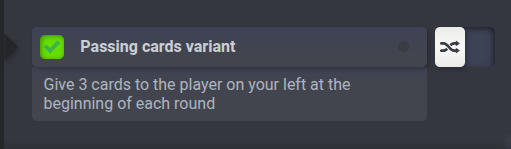
The description appears just below the dropdown when the variant is enabled. Setting default to 1 enables it unless the table creator changes the option. We do this because passing cards is a popular variant. For most games, variants are disabled by default.
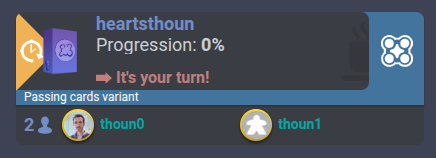
The tmdisplay field sets the label shown on BGA table listings when the variant is enabled:
    public function isPassingCardsVariantActivated(): bool {
        return boolval($this->bga->tableOptions->get(101));
    }
boolval converts the option value to a boolean. Wrapping tableOptions->get in this function makes the rest of the code easier to read.
Now we need to enter the correct state based on the table option. Add this function:
    public function redirectToNewRound() {
        return $this->isPassingCardsVariantActivated() ? GiveCards::class : PlayCard::class;
    }
At the end of setupNewGame, replace the current return line with return $this->redirectToNewRound();. This selects the next state based on the table option. In EndRound.onEnteringState, use return $this->game->redirectToNewRound();.
Start a new table to test each setting. The game should begin in GiveCards when the variant is enabled and PlayCard when it is disabled!
Optional: add unit tests
Follow the PHP testing instructions to set up PHPUnit and create the unit tests based on the examples provided for the Reversi project.
After the tutorial
We could add a background or arrange the player zones in a circle, but this tutorial is already long, so we will stop here. Feel free to try those improvements yourself!
If you want, you can also do the Reversi tutorial
Or continue with Before starting a real project